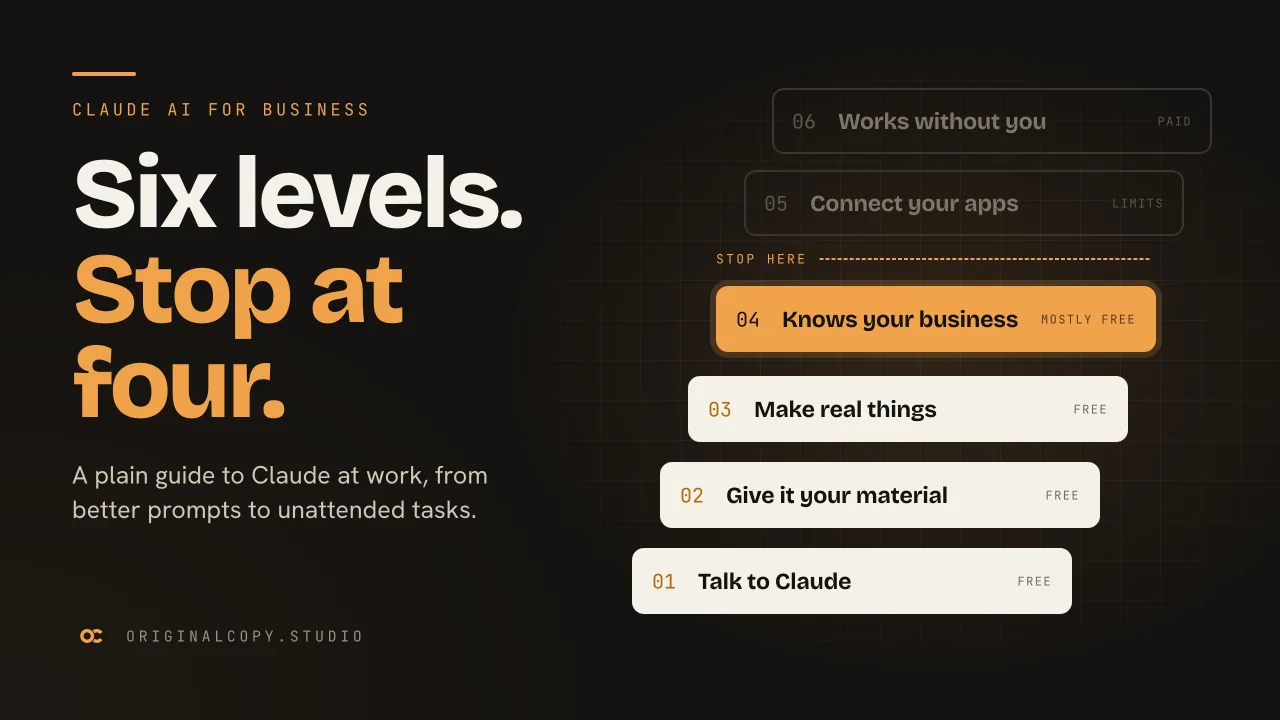
- Level 1: ask in three parts (context, task, format) and correct replies in the same thread. Free.
- Level 2: upload the actual document, photo or price list instead of describing it. Free, apart from Research.
- Level 3: ask for files and working pages rather than paragraphs. Free.
- Level 4: set up Projects and memory so Claude keeps your context between chats. Mostly free.
- Level 5: connect Calendar, Drive, Gmail and Slack, and install skills for repeat jobs. Free with limits.
- Level 6: give it one folder and a job, then let it run. Paid.
Levels one to four improve work you already do. Five and six only pay off once you have a repetitive job worth handing over.
The video version, 13 min 30 sec. Watch on YouTube
- 0:00The ladder
- 1:19Level 1: talk to Claude
- 3:23Level 2: give it your world
- 4:59Level 3: make real things
- 6:04Level 4: make it know you
- 7:33Level 5: connect your apps
- 9:13Level 6: it works without you
- 11:07Above level 6: Claude Code
- 12:15The verdict
Most people who use Claude at work are on level one. They type a question, read the reply and close the tab. That works, but it leaves most of the product unused, and the useful parts are not hidden behind a paywall.
This guide walks through all six levels with one running example: a small coffee roastery called Third Window. Following a single business the whole way makes it easier to see what each level adds. Swap in your own company, a client or a campaign as you read, because the levels behave the same way.
A note on shelf life. Menus move, so follow the reasoning rather than hunting for a button in exactly the place described. Prices, plan limits and model names were checked against Anthropic's own pages in September 2026. Treat the structure as stable and the numbers as something to re-check.
What is Claude AI?
Claude is an AI assistant made by Anthropic. You write to it in plain language and it replies, reads documents you give it and produces files. On paid plans it can also act on connected apps and folders without you watching. It runs in a browser, as a desktop app and on phones.
The chat box is where everyone starts, and it is the smallest part of the product.
| Level | What it adds | Cost | In a marketing team |
|---|---|---|---|
| 1. Talk to Claude | Better requests, refined in the same thread | Free | Briefing copy with the audience and tone spelled out |
| 2. Give it your material | Files, images, live search, deep research | Free, except Research | Reading a supplier deck or a rival's pricing page |
| 3. Make real things | Spreadsheets, documents, working pages | Free | A campaign tracker with live formulas, a landing page draft |
| 4. Make it know you | Projects and memory | Mostly free | One project per brand, holding the guidelines and tone notes |
| 5. Connect your apps | Connectors, MCP, skills | Free with limits | Answers from the real calendar or Drive instead of pasted copies |
| 6. It works without you | Folder access, approvals, scheduled tasks | Paid | A Monday report waiting before anyone logs in |
Level 1: talk to Claude
Learning the interface takes five minutes. Asking well takes longer, and it explains most of the difference between a generic answer and one you can use.
Give every request three parts:
- Context: what Claude cannot know on its own. Who you are, what you sell, who buys it.
- Task: the specific job. Not "write some copy" but "write the bag description for the Ethiopia Guji".
- Format: the shape of the answer, including length and tone.
Ask for coffee copy with none of that and you get words that would suit any roastery anywhere, because nothing in the request narrowed it down. Add the three parts and the reply is close to printable. The model, the plan and the price stay the same.
The second habit saves more time. When a reply is nearly right, answer it rather than opening a new chat. Everything you have already said stays in play, so corrections build on each other: make it half the length, keep the last line, drop the third paragraph. Treat the first reply as a draft.
For a team this is the cheapest fix there is. Put the three parts into your brief template and everyone's first drafts improve the same day.
Which Claude model should you pick?
Model names change every few months, so remember the tiers rather than the list. Haiku is the fast one. Sonnet covers most everyday work. Opus and Fable are the slower, pricier ones, worth using when a mistake would be expensive to fix. We compare all four in which Claude model to use.
There is also an effort setting, which controls how long Claude reasons before it answers. Turn it up for problems with many steps that depend on each other.
Both draw on a usage allowance that refills on a cycle, so running out on the free plan costs you time rather than money. A sensible point to start paying is when the limit stops you twice in the same week.
Level 2: give Claude your material
At level one Claude knows only what you typed. At level two it reads your material directly, which saves you summarising it and removes the mistakes that creep in when you do.
One piece of housekeeping first: keep each chat to one job and start a fresh one when the subject changes. Long threads drift off topic, and they use more of your allowance than several short ones.
Documents are the obvious win. A wholesaler's price list is the kind of PDF that normally means a calculator and twenty minutes. Asking which option is cheapest per kilo, and where the catch is, took seconds. It found the condition in the small print: the cheapest lot came with a sixty kilo minimum order.
Images work the same way. Photograph a product on a table and ask what is working against it. Here the background was competing with the product for attention. Screenshots, handwritten notes, contracts and bank statements can all be read.
Search is free and shows where each claim came from. Open at least one source whenever the answer matters, with this tool or any other.
Research is the paid version. It reads well over a hundred pages and returns a report with every source cited. It also uses allowance faster than anything else here, so save it for decisions with money attached, like changing supplier or signing a contract.
Level 3: make real things
Up to now, everything Claude produces is text in a chat. Level three produces files you can open, send and keep.
Ask for a spreadsheet to track roasts, with eight sample rows and a margin column, and you get a real spreadsheet file. The margin column holds a working formula rather than typed numbers, so changing a cost updates every margin. Documents, slide decks and PDFs come out the same way, and paid plans add dedicated tools in Claude Docs and Claude Slides.
The second kind of output is built live beside the conversation. A landing page for the roastery appears while it is being written, and you revise it by asking: warmer background, bigger headline. You can then take it somewhere you had not planned, such as turning the page into a quiz that recommends a roast and clicking through it yourself.
That took one sentence and about two minutes.
Level 4: make Claude know your business
Every level so far carries a hidden cost. Each new chat treats you as a stranger, so you re-explain the same background before any work starts. Level four removes that, and for most teams it is the biggest single improvement on offer.
A project is a shared workspace. Several chats live inside it and use the same material. You upload files once and write instructions once. For the roastery that meant the supplier list, the research report and a three-line brief: small roastery, plain warm voice, customers who brew at home. Writing good instructions is a skill of its own, and Kurt's breakdown of a 65-line instruction file built from Karpathy's complaints is a useful worked example.
After that, requests get short. "Give me three angles for the launch email" comes back already aware of the products, the tone and what is in stock, because the context lives in the project rather than in every message.
For a studio or an in-house marketing team, the natural setup is one project per brand or client, holding the brand guidelines, tone of voice notes and a few past campaigns. New briefs then start from the brand instead of a blank page.
Memory works from the other direction. Claude keeps things it notices while you work, without being asked, and carries them across the web app, desktop and phone. You can read what it has stored, correct it by telling it, or delete it.
If you would rather nothing was kept, the ghost icon opens an incognito chat. It is not saved, adds nothing to memory and is not used for training.
Level 5: connect your apps
This is the first level where Claude works on live data rather than a copy you pasted in.
Connectors cover Calendar, Drive, Gmail and Slack and need nothing beyond your authorisation. After that you ask in plain language. "Where did my hours actually go last week?" gets answered from the calendar itself, with nothing exported or pasted.
Read the authorisation screen properly. It lists exactly what you are granting, and you can revoke each item later.
MCP covers everything else. It is an open standard that works like a universal adapter, letting any tool make itself available to Claude, and you connect one by pasting in a server address. Expect two things: the first authorisation attempt often fails, which is normal, and the free plan allows one connection, so choose it carefully.
Paid plans can also run Claude inside Chrome, so it can work on the page you already have open.
Skills complete this level. A skill is a written procedure for one recurring job: the steps, their order and the standard to hit. Install it once and it is available in every later conversation, called by name with a slash or picked up by Claude when the job fits. The same request on the same deck comes back noticeably better with the right skill installed, because the skill spells out the standard your prompt left unsaid.
Level 6: Claude works without you
Until now you have been present for everything. Level six is where you stop supervising.
This launched separately as Cowork and has since been folded into Claude, where it sits next to Chat on web, desktop and mobile. It needs a paid plan.
You start by giving it access to one folder, and nothing else on the machine is visible to it. Then give it something tedious, such as a folder of supplier invoices with an instruction to pull the date, supplier and amount from each and compile them into one sheet.
Before it runs, you choose how closely to supervise: approve every action, carry on but pause for anything risky, or never pause. Run the first job on the strictest setting however simple it looks. Watching how it handles your files once teaches you more than any description of what it should do.
It works through the files and saves the finished sheet into the folder as a real file, not a message you have to copy out.
Scheduled tasks are the same thing on a timer. Define the job, choose how often it runs, and trigger a test run so the permissions are sorted before the first real one. The Monday report can be ready before you are.
Small businesses also get a library of ready-made jobs instead of a blank page: a Monday brief, closing the books, proposals, lead follow-up and marketing. They connect to software small companies already pay for, including QuickBooks, Shopify, Stripe, Xero and HubSpot, with roughly thirty more available.
Beyond level six: Claude Code
The name puts off the people most likely to benefit from it. Claude Code uses the same capability as level six, pointed at building software instead of sorting files, and you talk to it in ordinary English. It writes code because software is made of code; you never have to read any of it.
A site design handed to it became a working website in about twenty minutes. Two parts arrived broken, the images and the email signup, and describing the problem was enough to get both fixed.
The more interesting example: at level six, Claude sorted a folder of invoices once. Asked to build a tool instead, it made one. Add a coffee to the spreadsheet, double-click, and printable labels come out. That tool runs without opening Claude at all, so there is no chat window and nothing comes out of your allowance.
It goes a long way past labels. I used it to make a seven-minute animated film from a one-line brief. Most teams do not need to climb this high yet, though.
Which level should your team stop at?
Level four, for reasons that have nothing to do with what the higher levels can do.
Levels one to four improve work people already do every day, whatever the job. Levels five and six only repay their setup once you have a task that is repetitive, clearly defined and dull. Most teams have not found one yet, so they build the automation first, go looking for something to feed it, and it sits unused.
Get the team to level four and stay there for a month. If five and six are worth it for you, the need will show up without you looking for it.
Where to start this week
- Write one request with all three parts, context, task and format, and compare the reply with how you asked yesterday.
- Take the dullest document you have (a lease, a policy, a bank statement) and ask Claude to explain it back to you.
- Create one project, add two files and write three lines of instructions.
The third takes longest and pays back the most. I stayed on level one for months before doing it, which is most of the reason this guide exists.
Frequently asked questions
Is Claude AI free to use for business?
There is a free plan, and the first four levels run on it entirely or almost entirely. You need a paid plan for Research, Claude Docs and Claude Slides, Claude in Chrome, and unattended work on a folder. Every plan has a usage allowance that refills on a cycle, so hitting the limit on the free plan costs time rather than money. A sensible trigger for upgrading is being stopped by the limit twice in one week.
How do I write a good prompt for Claude?
Give it three things: the context it cannot guess (your role, product and audience), the specific task, and the format you want back, including length and tone. The same request with and without those parts produces very different results from the same model. When a reply is nearly right, correct it in the same chat instead of starting again, because the background you have already given carries forward.
What is a Claude Project?
A Project is a workspace that groups several chats around one set of files and instructions. You upload material and write the brief once, and every chat in the project uses both, so your requests get shorter. For marketing teams the most useful setup is one project per brand or client, holding the brand guidelines and tone notes. For most people it is the highest-return feature in Claude.
What is the difference between Claude Projects and memory?
Projects are deliberate: you choose what goes in and which chats use it. Memory is automatic: Claude picks up details as you work and carries them across web, desktop and mobile. You can review, correct or delete anything stored. Incognito chats are not saved, add nothing to memory and are not used for training.
What is the difference between Claude Skills and MCP?
A skill is a written procedure for a recurring job, telling Claude how to do it and what standard to hit. MCP is an open standard that lets outside software connect to Claude so it can read and act on real data. Calendar, Drive, Gmail and Slack come as ready-made connectors, and MCP covers the rest. The first MCP authorisation often fails and needs a retry, and free accounts get one connection.
What happened to Claude Cowork?
It is no longer a separate product. Anthropic folded it into Claude, where it sits next to Chat on web, desktop and mobile, on paid plans. You give it one folder, describe the job and choose how closely to supervise before it runs. Keep the first run on full manual approval, however routine the job looks.
Which Claude model should a beginner use?
Think in tiers, because the names change often: a fast tier, an everyday tier and a heavier tier for work where mistakes are expensive. In September 2026 those are Haiku, Sonnet, and Opus alongside Fable. A separate effort setting controls how long Claude reasons before answering. Heavier models and more effort both use your allowance faster.
Do you need to know how to code to use Claude Code?
No. Claude Code runs on the same foundation as level six, aimed at building software instead of organising files, and you direct it in plain English. It writes code because that is what applications are made of, but you never have to read or edit it. It sits above the six levels, and most people will not need it.
How far should a team go with Claude?
Level four: Projects and memory. The first four levels improve work people already do every day. Levels five and six only pay back their setup when there is a repetitive, well-defined job to hand over, and most teams cannot name one yet. Stay at level four for a month and let a real need for more show itself.
Sources
Everything here was checked against Anthropic's own pages in September 2026. Prices, plan requirements and model names move, so keep the shape and check the current figure.